
You’ve installed the app, explored the dashboard, and now you’re thinking—how do I actually add money here?
Fair question. And honestly, deposits are usually where people get confused the first time.
The good news? The BBRS Game keeps it simple if you follow the correct flow.
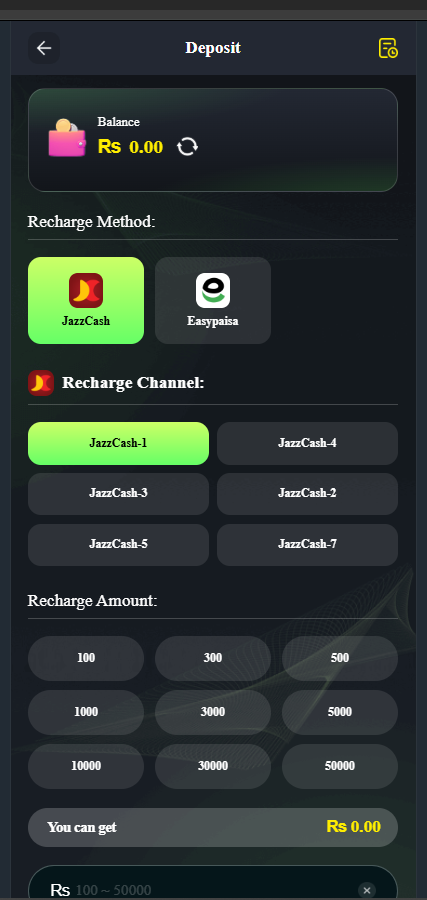
How the Deposit System Works
BBRS Game uses an in-app wallet.
You don’t pay directly inside games. First, you add balance to your wallet, and then you use that balance during gameplay.
So the flow is:
Deposit → Wallet → Play
That’s it.
No complicated steps once you understand this part.
How to Deposit in BBRS Game (Step-by-Step)
Follow these steps carefully to avoid errors or delays:
1) Open Wallet Section
Tap on your balance or wallet icon from the main dashboard. This is where all transactions happen.
2) Click on “Deposit”
Inside the wallet, select the deposit option. It will show available payment methods.
3) Choose Payment Method
Select one of the following:
- JazzCash
- EasyPaisa
- Bank Transfer
Pick the one you use most often for faster confirmation.
4) Enter Deposit Amount
Type the amount you want to add. Minimum deposit usually starts from Rs. 200–500.
5) Complete Payment
Follow the instructions shown (account number or payment request). Once done, confirm inside the app.
Now wait for balance to reflect.
Payment Methods Explained
JazzCash (Most Popular)
JazzCash is the fastest and easiest method for most Pakistani users.
Transactions usually confirm quickly, especially during normal hours.
If you want fewer delays, go with this.
EasyPaisa (Widely Used)
EasyPaisa works smoothly and is a good alternative.
It may take slightly longer sometimes, but still reliable.
Good option if JazzCash is not available.
Bank Transfer (For Larger Deposits)
Bank transfers are useful for higher amounts.
But they are slower compared to mobile wallets.
Use this when you’re depositing bigger balances.
Deposit Time – How Fast Is It?
- JazzCash: Usually fast (often within minutes)
- EasyPaisa: Moderate speed
- Bank Transfer: Slower, depends on bank timing
If your deposit doesn’t show instantly, don’t panic.
Sometimes it takes a little time to reflect.
Important Tips Before Depositing
Use these to avoid common mistakes:
- Always enter the correct payment details
- Don’t refresh or close app during confirmation
- Keep screenshot of your transaction (just in case)
- Use same mobile number as your wallet account
Small things—but they prevent big issues.
Common Deposit Problems (And Fixes)
Balance Not Showing?
Wait a few minutes. If still not updated, check transaction status.
Wrong Amount Entered?
Double-check before confirming. Changes after payment are difficult.
Payment Failed?
Retry using stable internet or switch method.
Delay in Confirmation?
Happens during peak hours. Usually resolves automatically.
Most problems are temporary.
Is Depositing Safe?
BBRS Game supports common Pakistani payment methods, which adds basic reliability.
The process doesn’t ask for unnecessary permissions or sensitive data beyond payment confirmation.
Still, always make sure you’re using the correct official payment details inside the app.
Avoid random instructions from outside sources.
FAQs – Deposit Related
What is the minimum deposit?
Usually between Rs. 200 and Rs. 500.
Which method is best for deposit?
JazzCash is the fastest for most users.
How long does deposit take?
Mostly instant or within a few minutes.
Can I deposit anytime?
Yes, deposits are available 24/7.
What if my balance doesn’t update?
Wait and then check your transaction. Contact support if needed.
Are there any deposit charges?
Some methods may include small service charges.
Final Tip Before You Deposit
Start small.
Test with a low amount first, see how the system behaves, and then go bigger if everything works fine.
That’s the safest approach.
Add Balance to BBRS Game Now
Open the wallet, choose JazzCash or EasyPaisa, and deposit into BBRS Game to start playing instantly with a system that’s simple, fast, and designed for Pakistani users.